
Blending UX, strategy, and execution to fuel product growth.
Blending UX, strategy, and execution to fuel product growth.
Kraya AI – The CRM That Lives in WhatsApp
Built and scaled a B2B SaaS tool for WhatsApp-led lead management, follow-ups, and AI-powered sales productivity.
Team
1 PM (myself), 5 developers, 5 QAs and 3 designers including me
Timeline
11 Months
(discovery → design → launch → iteration)
My Role
Product Strategy, Research, UX/UI design, QA, GTM, Stakeholder Management
Overview: A WhatsApp-Native CRM Built for Speed, Simplicity & Scale
Kraya AI was built to solve a focused yet widespread challenge – businesses using WhatsApp for sales lacked a structured system to manage leads, conversations, follow-ups, or performance. Existing CRMs didn’t live where these teams worked, and traditional tools felt bloated, disjointed, or too expensive.
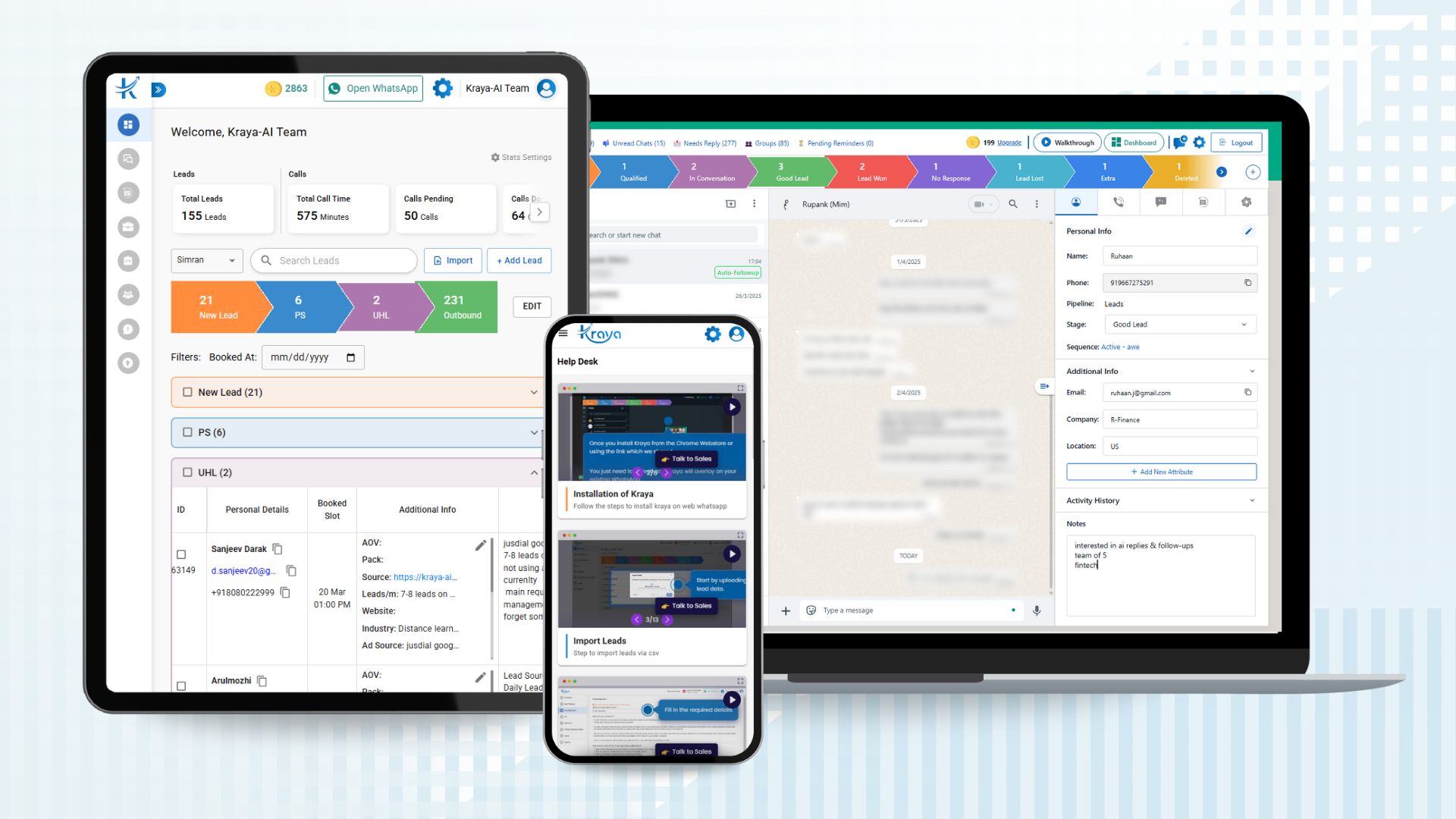
As the Product Manager, I led Kraya AI from 0→1 transforming it into a fully functional subscription-based B2B SaaS product, adopted by paying clients. We delivered the product as a Chrome extension integrated directly into WhatsApp Web, with an optional web dashboard for deeper pipeline management, analytics, and team collaboration.
Kraya AI allowed users to capture, manage, and close leads without switching tabs. Leads could be created and tracked from multiple channels including:
Manual entries within the WhatsApp Extension
Lead forms embedded on websites
Bulk imports through Google Sheets
API-based integrations with external platforms
The result was a fast, intuitive CRM that embedded itself into daily sales workflows. By focusing on usability, WhatsApp-first design, and practical automation, Kraya AI helped clients manage leads more effectively – and unlocked a consistent new revenue stream for the business.
Problem Statement
While WhatsApp had become the default sales and communication channel for many growing businesses, it was never designed to function as a CRM. As a result, teams were forced to rely on disconnected workarounds – spreadsheets, manual notes, memory, or tools like Google Streak – none of which scaled well.
The existing sales process exposed multiple operational gaps:
Unstructured Lead Tracking: Sales agents had no system to log, categorize, or update lead progress directly from WhatsApp.
Missed Follow-Ups & Delayed Replies: Without reminders or automation, leads frequently went cold after initial outreach.
Lack of Accountability: There was no visibility into who was handling which lead, how long they’d been in a stage, or if action was overdue.
Tool Fatigue: CRMs required switching tabs, losing context, or duplicating efforts – creating friction and reducing adoption.
No Analytics or Ownership Clarity: Business owners couldn’t track lead performance, source attribution, or individual/team productivity.
The opportunity was clear: build a WhatsApp-native CRM that eliminated these gaps, matched the workflow of fast-paced teams, and delivered structure without friction.
Research & Insights
To shape Kraya AI’s roadmap, we conducted in-depth user interviews, internal process audits, and a focused competitive analysis of WhatsApp-first CRM tools — specifically browser extensions designed to enhance the WhatsApp Web experience. These tools were evaluated based on automation capabilities, lead tracking, AI-driven support, and workflow integration.
📊 Competitor Analysis: WhatsApp CRM Extensions
We benchmarked leading GMAT prep platforms — including Magoosh, Manhattan Prep, GMAT Club, and Official GMAT Prep — to evaluate pricing models, content structure, and engagement strategies.
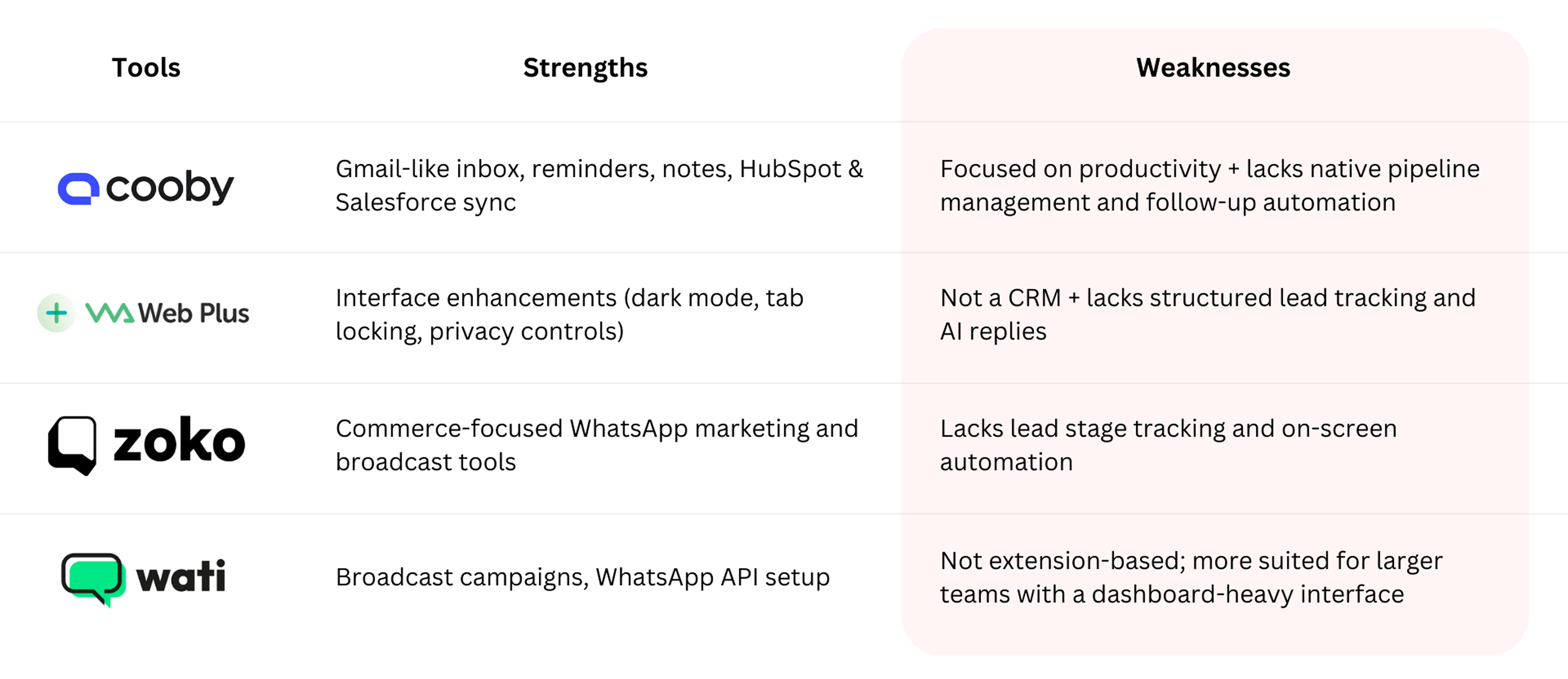
Most tools focus on productivity features (like inbox management) rather than structured lead lifecycle management.
Cooby excels in providing a smooth workflow inside WhatsApp but lacks native pipeline management and follow-up automation, which would be a critical advantage for Kraya.
Other tools, such as WA Web Plus and Zoko, enhance WhatsApp functionality but don’t provide comprehensive CRM features or AI-powered automation.
These insights revealed a clear gap in the market for a tool that offers full lead lifecycle management, AI assistance, and real-time analytics all embedded within WhatsApp itself – a space where Kraya AI can uniquely position itself as a complete WhatsApp-first CRM solution.
👥 User Research & Survey Findings
To ground our product direction in real-world needs, we conducted over 20+ interviews and surveys with solopreneurs, agency owners, and sales agents who actively use WhatsApp as their main client communication and conversion tool. These conversations uncovered consistent pain points around lead management, follow-ups, and tool fragmentation.
Recurring Pain Points (in their own words):
❝ I message 100+ leads a week and I have no idea who I followed up with and who I forgot. ❞
~ Sales Agent, Education Consultancy
❝ I use WhatsApp, Sheets, and a Notes app all at once. It’s a mess, and things always fall through the cracks. ❞
~ Founder, Marketing Agency
❝ CRMs feel like overkill. I don’t want to learn a new tool — I just want to work inside WhatsApp. ❞
~ Independent Coach
❝ I need reminders, follow-up tracking, and lead stages — but not outside WhatsApp. Everything else just slows me down. ❞
~ Sales Executive, SaaS Startup
Key Themes Identified:
Fragmented Workflows: Users were juggling 3-5 tools daily (WhatsApp, spreadsheets, note apps, calendars, CRMs).
Follow-Up Fatigue: Manual follow-ups often slipped through due to lack of visibility and reminders.
Tool Aversion: Traditional CRMs were seen as bloated and disruptive to the user’s natural workflow.
Desire for Embedded Simplicity: Strong preference for a lightweight system that works within WhatsApp, not outside it.
Urgency Over Complexity: Speed, clarity, and contextual recall mattered more than CRM depth or analytics complexity.
🎯 These insights reinforced our belief: users don’t need another dashboard, instead they need contextual, on-screen automation right inside WhatsApp. This shaped our vision for Kraya AI as a WhatsApp-native CRM that brings lead tracking, AI support, and follow-up management into the user’s natural workflow.
Solution & Execution: A WhatsApp-Native CRM
To tackle these challenges, we built Kraya-AI, a WhatsApp-native CRM with an integrated dashboard designed to streamline sales workflows, improve lead tracking, and centralize communication – without forcing teams to change the way they work.
- WhatsApp Extension: A lightweight Chrome extension that embeds CRM features directly into WhatsApp Web, allowing sales reps to manage leads, update statuses, and add notes in real time – without switching tabs.
- Lead Overview & One-Click Actions: Quick access to lead details like name, stage, additional details, and follow-up notes, with instant actions such as stage updates and reminders – all from within the chat window.
- AI Replies: Context-aware message suggestions powered by past conversations and lead context, helping reps reply faster and more effectively.
- Centralized Dashboard: A powerful backend system for sales managers and operations teams to assign leads, track performance, analyze funnels, and manage follow-ups at scale.
- Custom Pipeline & Analytics Views: Filter by team member,lead stage, overdue leads, or last activity to stay on top of every prospect and improve accountability.
By combining WhatsApp-native usability with a high-visibility dashboard, Kraya-AI helps teams boost productivity, reduce lead leakage, and ensure no opportunity slips through the cracks.
My Role & Responsibilities
As the Product Owner of Kraya-AI, I led the product from concept to execution — overseeing every aspect of user research, workflow definition, UX decisions, testing, and internal adoption. I worked closely with a team of developers and designers to ensure the product delivered maximum impact with minimal friction.
- Product Ideation: Identified key workflow inefficiencies in lead tracking, follow-ups, and sales team visibility inside WhatsApp-based processes.
- Solution Definition: Defined the product vision, MVP scope, and monetization path for a WhatsApp-native CRM. Prioritized features using the RICE framework and mapped user journeys across the dashboard and extension.
- UX/UI Ownership: Created wireframe concepts and interaction flows, reviewed Figma designs, wrote all UX copy, and approved final UI across dashboard and extension views.
- Cross-Team Collaboration: Worked across Engineering (backend + Chrome extension), Design, QA, and Business teams (sales, support, GTM) to scope, build, and ship features.
- Testing & Feedback Loops: Ran a closed beta with 50+ internal users, built walkthroughs and usage triggers, and continuously iterated based on user friction and feedback.
- Adoption & Rollout: Trained teams on usage, tracked adoption through overdue follow-ups, AI usage, and data visibility metrics. Integrated Kraya-AI into the customer onboarding and upgrade journey.
- Revenue Strategy: Collaborated with business to define subscription plans, gating, pricing triggers, and upgrade flows.
Execution: Building Kraya’s WhatsApp CRM from the Ground Up
Kraya AI was built as a WhatsApp-first CRM, designed for sales teams who already operate on WhatsApp and needed intelligent automation, lead tracking, and AI tools – all within the same interface. Our solution spanned across two core environments: the Dashboard CRM and a Chrome Extension overlay for WhatsApp Web.
🖥️Unified WhatsApp CRM Dashboard
The dashboard served as the command center — enabling admin controls, automation rules, lead visibility, and pipeline performance insights.
🧾 Lead Management System
Leads could be added through multiple entry points:
Manual creation inside the dashboard or WhatsApp extension
Form-based submissions via “Book a Call” widgets
Google Sheets integration, using App Script for real-time sync
API-based imports for enterprise clients, with support for UTM parameters and metadata
Each lead captured essential fields like:
Full Name, Phone Number, Email
Pipeline & Stage assignment
Custom attributes as needed (Tags, Lead Owner, Source)
Auto-sync with WhatsApp extension ensured CRM status matched chat context
This omnichannel capture approach minimized leakage and ensured every inbound interaction became trackable.
📊 Dashboard, Pipeline Management & Real-Time Analytics
The Kraya Dashboard served as the control center for all lead activity, team performance, and automation workflows. It offered a holistic view across pipelines, backed by real-time data and visual insights.
Custom Pipelines & Stage Tracking
Teams could build pipelines tailored to their sales journeys, with default stages like:
New Lead
Intro Call
Qualified
Demo Scheduled
Lead Won / Lost
These stages provided a ready-to-use template, while remaining fully customizable by admins or team leads. Each pipeline tracked:
Days in Stage to prioritize stuck leads
Last Call Made / Last Response Time for timely engagement
AI-triggered or manual stage shifting
Individual pipeline views for each rep
Admin-level oversight across all stages and pipelines
Real-Time Stats & Reporting
The dashboard featured stat cards and deep-dive views to surface trends and drive decision-making:
At-a-glance Metrics: Total leads, AI replies sent, conversions, calls logged
Smart Filters: Drill down by user, pipeline, lead tags, and time range
Interactive Tables: Clicking on any stat updated the lead table for contextual analysis
Conversion Trends: Daily and weekly trends to highlight drop-offs or pipeline bottlenecks
Performance Insights: Compare pipelines, track follow-up velocity, and identify reps needing support
Together, these tools turned Kraya into more than just a CRM and it became a real-time sales intelligence layer, driving accountability and improving operational clarity across teams.
🤖 Lead-Based Auto-Responder Builder
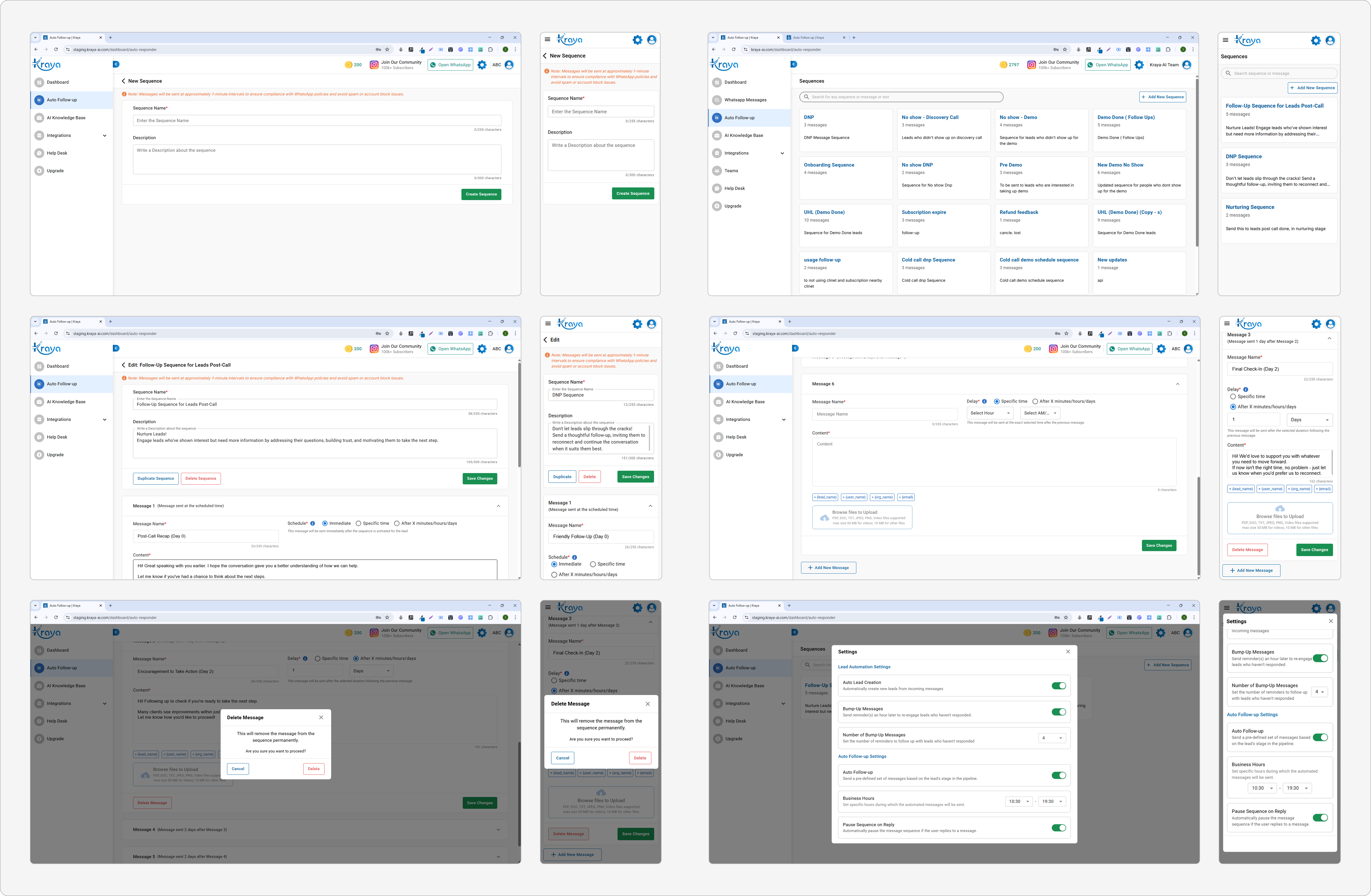
Initially built as a stage-driven system, the auto-responder feature was later redesigned to work on a per-lead basis, giving teams greater flexibility in how follow-ups were personalized and triggered.
Sequence Creation & Configuration: On the dashboard, users could create fully customized follow-up sequences with:
Message Templates – Write & reorder multiple follow-up messages
Delay Settings – Define time gaps in hours/days between messages
Bump-Up Logic – Trigger gentle nudges if the lead remained unresponsive
Manual Reply Detection – Auto-pause the sequence if a rep replied directly
Real-Time Status Visibility: Each lead’s assigned sequence showed up in the CRM dashboard with clear metadata:
Status: Active / Paused / Ended
Trigger Timer: Countdown to the next scheduled message
Preview: See upcoming messages queued for that lead
This ensured team-wide visibility into what was running where, without needing to switch tabs or rely on guesswork.
📥 Lead Import System
To ease bulk data operations, we enabled:
CSV uploads with customizable field-mapping
Stage and pipeline assignment during import
Duplicate checks based on phone numbers
API-based lead push with documentation for developers
This reduced onboarding time for new clients and let them migrate from other CRMs or Excel-based tracking seamlessly.
🧷 Floating WhatsApp Widget
To help businesses capture leads directly from their websites, we built a code-free, customizable widget generator that seamlessly connected visitors to WhatsApp. Key Capabilities:
Custom Branding: Choose widget colors, positioning, call-to-action text, and greeting messages to match brand identity.
Device-Based Targeting: Show or hide the widget on desktop vs. mobile to optimize for different browsing behaviors.
Live Preview: Real-time visual preview of the widget before deployment, no coding needed.
Once placed on a client’s site, the widget routed users straight to WhatsApp, significantly reducing friction and enabling:
Faster lead capture
Higher-quality inbound conversations
Shorter time-to-first-contact for sales teams
This widget became a critical top-of-funnel feature that funneled web traffic directly into Kraya’s automated CRM workflows, boosting both engagement and conversions.
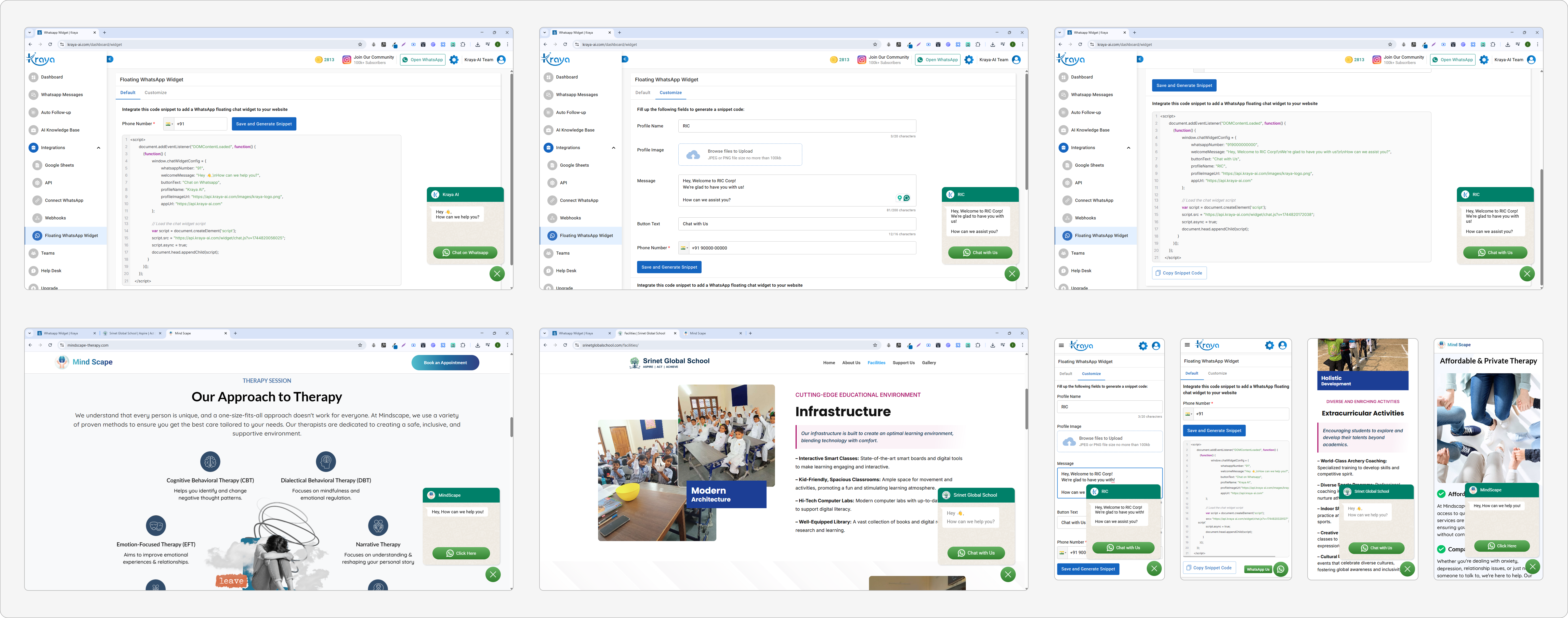
WhatsApp Widget UI Design & Live Integration on Client Websites
🖥️Chrome Extension on WhatsApp Web
The extension brought CRM functionality directly into WhatsApp, creating an overlay that empowered agents to work within their existing workflow, without switching tabs or losing context. Extension Sidebar made lead management seamless with these tabs:
Lead Info – All lead details, attributes, tags, notes
Quick Replies – Saved templates with dynamic placeholders
Calls Done – Logged calls with timestamps and summaries
AI Tools – Smart reply suggestions, past response history
Smart Filters helped users focus faster:
All Chats
Unread
Needs Reply
Custom pipeline stages (e.g. “Qualified”, “Demo Done”)
Group or archived chats
- Follow-ups Pending
⚡ Lead Auto-Creation: When new WhatsApp messages came in from unknown numbers, leads were automatically created if enabled in settings, ensuring no potential client was missed.
🤖 AI-Powered Automation & Lead Qualification
Kraya’s AI engine allowed real-time automation that saved hours of manual effort while improving lead conversion quality.
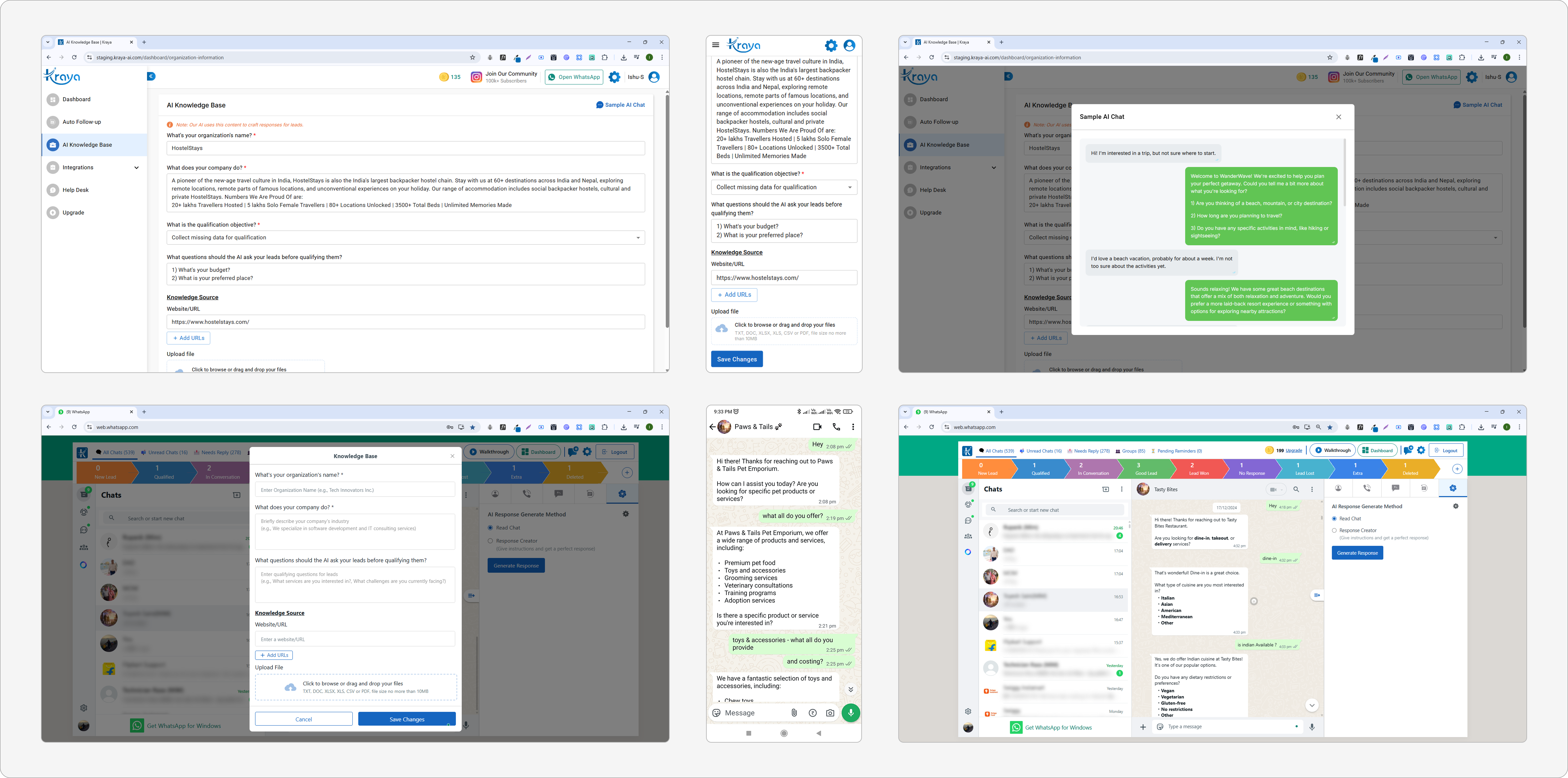
AI Knowledge Base & Smart Personalization : To make AI responses more context-aware and business-aligned, Kraya allowed teams to upload:
📄 PDFs (e.g. brochures, pitch decks, pricing)
🌐 Website/product links
📘 Internal documents like onboarding decks
These documents trained the AI engine embedded in the extension to respond with tailored, relevant replies based on the company’s tone, offering, and processes. Additionally, users could personalize responses or notes using Quick Add Buttons with smart placeholders like: {lead_name}, {your_name}, {org_name}, etc. This allowed personalization at scale, making every interaction feel more human while still leveraging automation.
AI Auto-Replies:
Contextual replies triggered only when no manual reply was detected
Respect for business logic: turned off during off-hours or after agent takeover
Trained using the company’s uploaded knowledge base (brochures, docs, site)
Lead Qualification Logic:
After 2–3 AI exchanges, Kraya ran an auto-qualification check
If conditions were met (based on FAQ triggers, conditions added in knowledge base, pricing match, etc.), the lead was automatically moved to the “Qualified” stage
AI replies were paused post-qualification to prevent overspam
🤖 Lead-Based Auto-Responder Controls
On the WhatsApp Extension, reps had full autonomy to assign or adjust auto-responders on the go — directly from within the chat interface.
Assignment Prompt on Stage Shift: When a lead was moved to a new pipeline stage, a popup modal appeared asking the user to:
Assign a sequence
Update the current automation
Delete the sequence entirely
This helped reps tailor the follow-up logic to the lead’s latest status and behavior.
In-Chat Responder Tab: The Auto-Responder tab inside the extension gave reps real-time control:
Dropdown of Sequences – Browse and switch sequences quickly
Next Message Tracker – See countdown and preview of the next message
Pause/Resume Toggle – Instantly control automation without leaving the chat
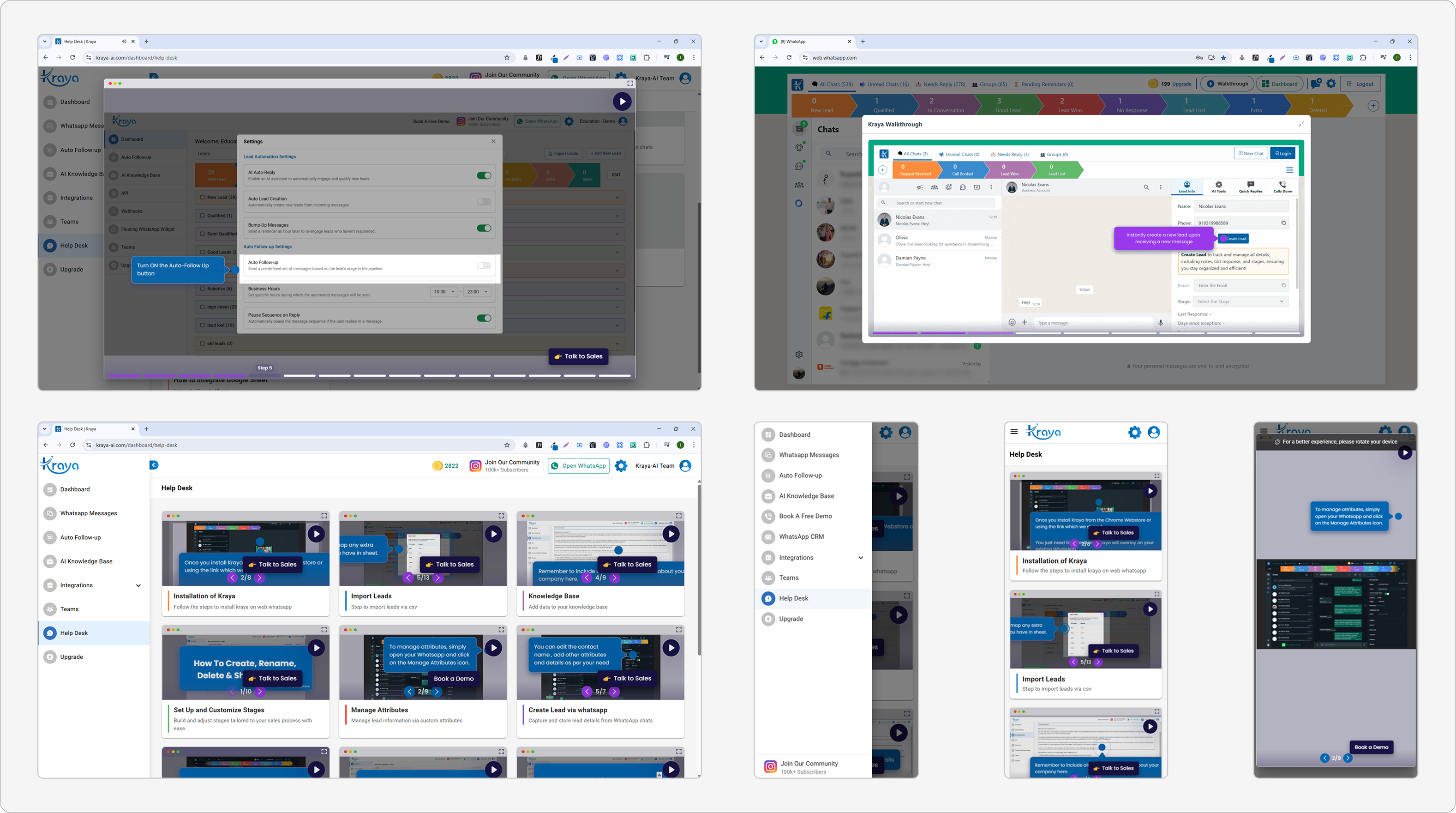
🚀 Walkthroughs & Onboarding UX
To boost adoption and reduce support overhead:
We created Storylane-powered walkthroughs inside the extension and dashboard
Inline CTAs explained each tool on first use
“Help” tabs housed documentation and demo videos
💰 Monetization & Pricing Integration
Freemium Plan Limits: Free users had the ability to:
Create up to 5 follow-up messages
Generate up to 50 AI replies
Add a maximum of 5 stages
Once users hit these limits, tooltips and upgrade prompts were displayed to encourage upgrading.
In-App Pricing Modal: A “Pricing” tab was available on both the dashboard and the extension, offering:
Clear display of plan benefits
Direct redirection to WhatsApp for upgrade requests
Triggered team alerts for upgrade inquiries
Results & Impact
2.5x More Leads Processed
WhatsApp-native CRM reduced data entry time by 65%, enabling teams to handle larger volumes.
40% Faster Deal Closing
AI-powered stage transitions and bump-ups shortened sales cycles from 14 to 8.4 days.
300+ Custom Attributes Logged
Flexible fields captured unique business needs without engineering work
92% Message Accuracy
Context-aware AI replies required minimal edits before sending
78% Fewer Lost Leads
Automated follow-up system recovered previously missed opportunities.
3.2x Pipeline Visibility
Real-time dashboard helped managers identify bottlenecks 3x faster.
Qualitative Feedback
Following the rollout of Kraya-AI, we received consistent feedback from internal sales teams and early client partners. The results validated our design decisions: simplifying workflows, increasing visibility, and helping users close more deals, faster.
❝ Now I don’t have to remember anything – Kraya reminds me who to follow up with and when. It’s made my day so much easier. ❞
❝ Earlier I had to spend time figuring out who was worth pursuing. Now Kraya auto-qualifies leads based on responses – it’s effortless. ❞
❝ The AI replies are surprisingly accurate – they help me say the right thing faster, especially with cold leads. ❞
❝ I’ve stopped using Google Sheets altogether. Everything I need is inside WhatsApp now – notes, stages, even follow-ups. ❞
❝ This doesn’t feel like a new tool. It just feels like WhatsApp, but smarter. I didn’t even need training to start using it. ❞
❝ I actually enjoy doing follow-ups now. I just open WhatsApp, check my follow-ups pending tab – no more hunting for updates across tabs. ❞
Key Takeaways
Build where users already are – embedding the CRM in WhatsApp changed adoption overnight.
Gated upgrades work – soft nudges and in-flow pricing CTAs led to real conversions.
Even simple UX wins matter – like notes auto-save, stage dropdown, quick reply and follow-up pre-made templates or default call types.
Shipping fast > waiting perfect – iterative launches helped refine flows based on actual usage.