Blending UX, strategy, and execution to fuel product growth.

Scaling Sales Inside WhatsApp - Without Losing Control
AI-Assisted SaaS
B2B SaaS
WhatsApp CRM
Chrome Extension
RAG-Based AI
Workflow Automation
Product Strategy
Kraya is a WhatsApp-native CRM that lets sales teams manage leads, follow-ups, and conversations directly inside WhatsApp Web – with AI assistance designed to scale outreach safely, without breaking trust or workflows.
TEAM
1 Product Manager (me)
3 UI/UX Designers
5 Developers
5 QAs
ROLE
Product Strategy & Roadmapping
AI System Design (RAG-based, human-in-the-loop)
UX/UI Ownership (Extension + Dashboard)
QA Lead (Edge cases, safety, fallbacks)
GTM & Stakeholder Alignment
TIMELINE
11 Months
(strategy → MVP → launch → adoption → iteration)
TL;DR – Executive Summary
Kraya AI is a WhatsApp-native CRM built to help high-velocity sales teams manage leads, follow-ups, and responses directly inside WhatsApp Web.
I led Kraya from 0→1, identifying the core workflow breakdown, defining system architecture, designing safe AI usage, and shipping a Chrome extension–based product adopted by paying teams.
Early impact across pilot teams:
~2.5× increase in leads processed per rep
~40% faster median time-to-close
~78% reduction in leads lost due to no response
This case study focuses on product judgment, system design, and responsible AI adoption in a customer-facing workflow — not just features shipped.
Why Kraya Exists
Kraya was not built to “add AI to WhatsApp.”
It was built to fix a structural breakdown we repeatedly observed in sales-driven businesses.
WhatsApp had become the primary sales channel — but teams were operating without any real system around it.
Sales teams were:
Managing hundreds of conversations manually
Tracking follow-ups in spreadsheets or memory
Responding inconsistently based on individual judgment
Missing leads due to delayed responses
Lacking visibility into pipeline health or accountability
Traditional CRMs existed, but they lived outside WhatsApp.
Every context switch reduced speed, accuracy, and adoption.
Core Insight
If sales happens inside WhatsApp, the CRM must live inside WhatsApp – not beside it.
The Real Problem (Beyond “WhatsApp Is Not a CRM”)
This was not a tooling problem.
It was a control and trust problem.
Business Reality
- Every inbound message required manual effort
Lead qualification varied by sales rep
Slow responses caused drop-offs
No reliable way to prioritize high-intent leads
No system to scale without breaking trust
Why This Was Hard
WhatsApp conversations are unstructured and context-heavy
Errors are customer-visible
Fully autonomous AI carried reputational risk
Over-engineered CRMs failed adoption tests
Key PM Question
Can we reduce manual effort and improve conversion without sacrificing trust or control?
Early Hypotheses That Shaped the Product
Before designing solutions, I framed the problem into testable hypotheses:
If CRM workflows live inside WhatsApp, follow-ups will become consistent
If lead context is visible alongside conversations, reps won’t rely on memory
If AI assists with language-heavy work (not decisions), teams can scale safely
Every feature shipped was evaluated against these hypotheses.
Product Strategy: System First, AI Second
One of my earliest decisions was not to start with AI.
AI only works when:
There is structure
There is context
There are clear boundaries and fallbacks
Kraya was designed as a multi-layer system, with AI layered on top – not bolted on.
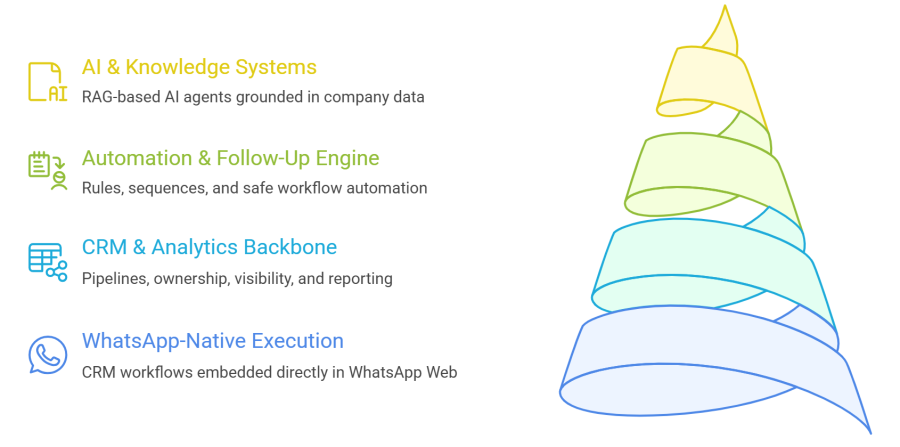
The Four Core Layers
WhatsApp-Native Execution
CRM & Analytics Backbone
Automation & Follow-Up Engine
AI & Knowledge Systems
Layer 1: WhatsApp-Native Execution (Chrome Extension)
This layer determined adoption.
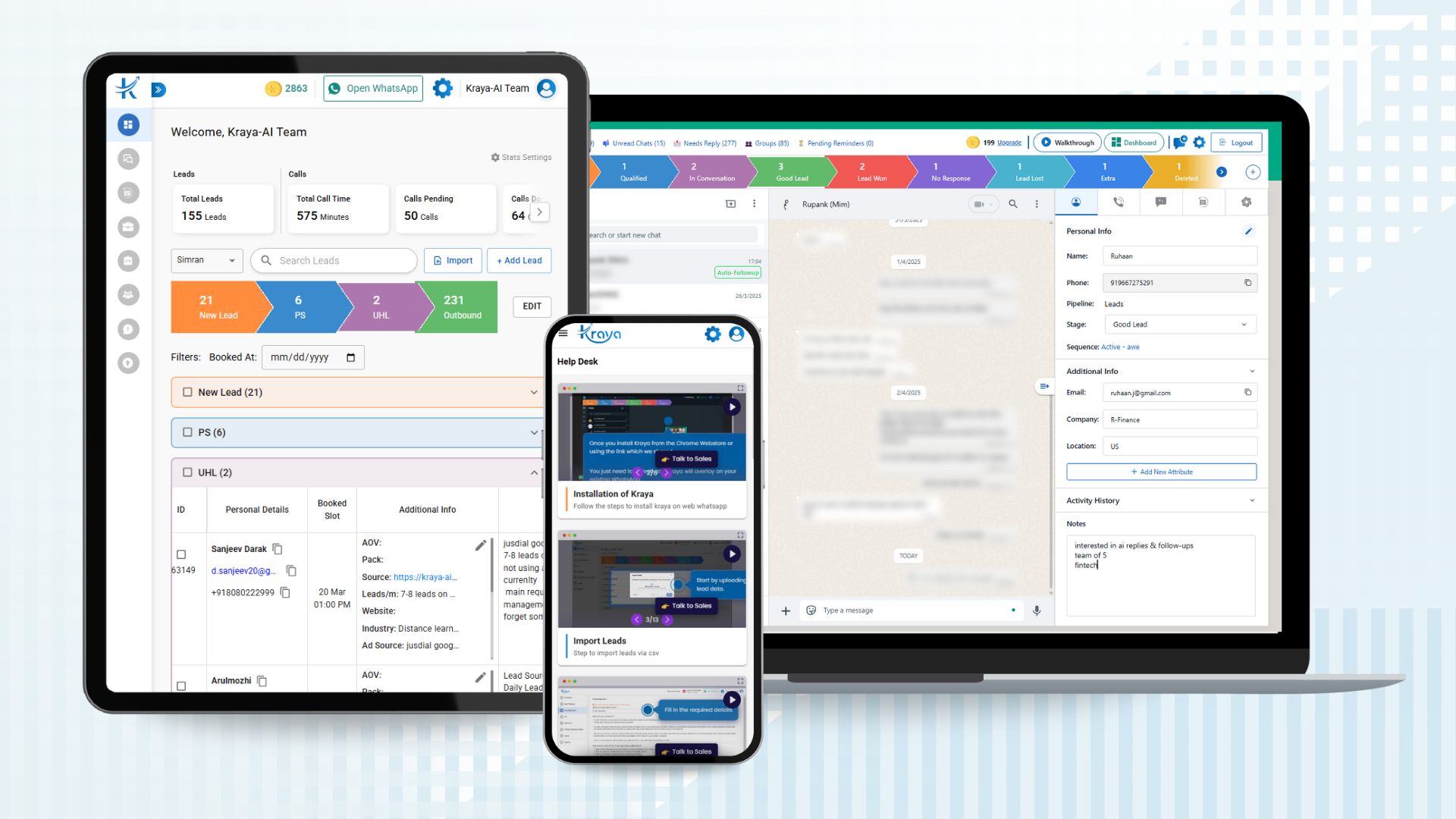
Instead of forcing sales teams into a new tool, I embedded CRM functionality directly into WhatsApp Web.
What I Led
- Persistent CRM sidebar inside WhatsApp
- Lead details, stages, notes, calls, follow-ups
- Zero tab-switching workflows
Key Product Decisions
- CRM actions live inside the chat context
- Notes auto-save to remove friction
- Inline stage updates reduce cognitive load
- UX parity with dashboard prevents relearning
Explicit Tradeoff (Deliberate)
Choosing a Chrome extension was intentional.
Pros
- Zero learning curve
- Immediate access to active conversations
- Faster validation and iteration
Constraints
- Requires WhatsApp Web to be open
- Limited background automation
- Browser-dependent performance
I accepted these constraints to validate workflow adoption first, before scaling infrastructure.
Layer 2: CRM & Analytics Backbone
The dashboard acted as the source of truth.
Capabilities I Owned
-
Custom pipelines and stages
-
Days-in-stage tracking
-
Call logs and follow-ups
-
Bulk lead actions
-
Filters by owner, stage, overdue
-
Lead imports (CSV, Google Sheets, API)
Every AI action reflected CRM state – never guesses.
Layer 3: Automation Before Intelligence
Before AI replies, I designed rule-based automation.
What Came First
Stage-based follow-up sequences
Time-delayed reminders
Pause-on-reply logic
Manual overrides at every step
Full visibility into active automation
AI should enhance predictable systems – not replace them.
This reduced risk and built confidence in later AI adoption.
Layer 4: AI Systems
RAG-Based Knowledge Grounding
I led the design of a Retrieval-Augmented Generation (RAG) system to ground AI responses in company-specific knowledge.
Teams could upload:
PDFs
CSVs
Website links
Internal documents
AI responses were generated only from this knowledge base, avoiding hallucinations and generic replies.
Custom, Organization-Specific AI Agents
Each company effectively operated with a custom, constrained AI agent.
Agent behavior was shaped by:
Company knowledge base
Qualification rules
Automation logic
Confidence thresholds
The agent could:
Engage new inbound leads automatically
Ask qualifying questions
Draft responses
Flag intent
Update lead stage
All actions were visible, reversible, and override-able.
AI-Assisted, Not Autonomous (Critical Judgment Call)
I explicitly rejected full autonomy early.
AI was allowed to:
Interpret language ambiguity
Draft responses
Assist qualification
AI was not allowed to:
Take irreversible actions
Send messages blindly
Make payment or routing decisions
Principle
AI handles ambiguity. Rules handle responsibility.
Teams wanted AI support without risking trust, WhatsApp policy issues, or accidental customer messages, reinforcing human-in-the-loop design.
Operational Control & Business Hours
AI behavior was intentionally tied to active user context and business rules.
AI replies and automation ran only when the WhatsApp extension was active and within configured business hours, ensuring messages were not sent blindly or at inappropriate times.
This gave teams full control while still benefiting from AI assistance during active work hours.
QA, Safety & Evaluation
I personally led QA strategy across AI and non-AI flows.
What Was Tested
Edge cases across extension and dashboard
Logged-out and failure states
Automation conflicts
AI fallback behavior
Metrics I Defined
Manual effort reduction
First response time
Qualified lead conversion
AI override rate (trust signal)
AI success was defined as helping humans perform better, not replacing them.
Results & Impact
Across pilot teams and early adoption:
More Leads Processed
Faster Deal Closing
Fewer Lost Leads
Reduction in Manual CRM Work
What Didn’t Work (And Why It Mattered)
Some users expected full automation → trust friction
Extension limits restricted background workflows
Early AI prompts needed tuning
These failures informed onboarding, positioning, and roadmap priorities.
Final Reflection
Kraya reinforced a belief I now apply to every AI product I lead:
Great AI products are not about intelligence – they are about judgment.
Judgment in:
Where to apply AI
Where not to
How fast to let it act
How to measure trust
That judgment is what I bring as a Product Manager.
What This Case Study Demonstrates
System-level product thinking
Responsible AI design using RAG and constrained agents
Strong UX and adoption instincts
Ownership across Product, Design, QA, and GTM
Ability to ship AI in real, high-risk workflows